

Manage user sessions
Store tokens safely with proper cookie security, validate on every request, and refresh with rotation to keep sessions secure
User sessions determine how long users stay signed in to your application. After users successfully authenticate, you receive session tokens that manage their access. These tokens control session duration, multi-device access, and cross-product authentication within your company’s ecosystem.
Store those tokens securely, validate them on every request, and refresh them before they expire. Session middleware writes one encrypted sk_session cookie and does that work for you. You can still store and refresh tokens yourself if you prefer.
Review the session management sequence
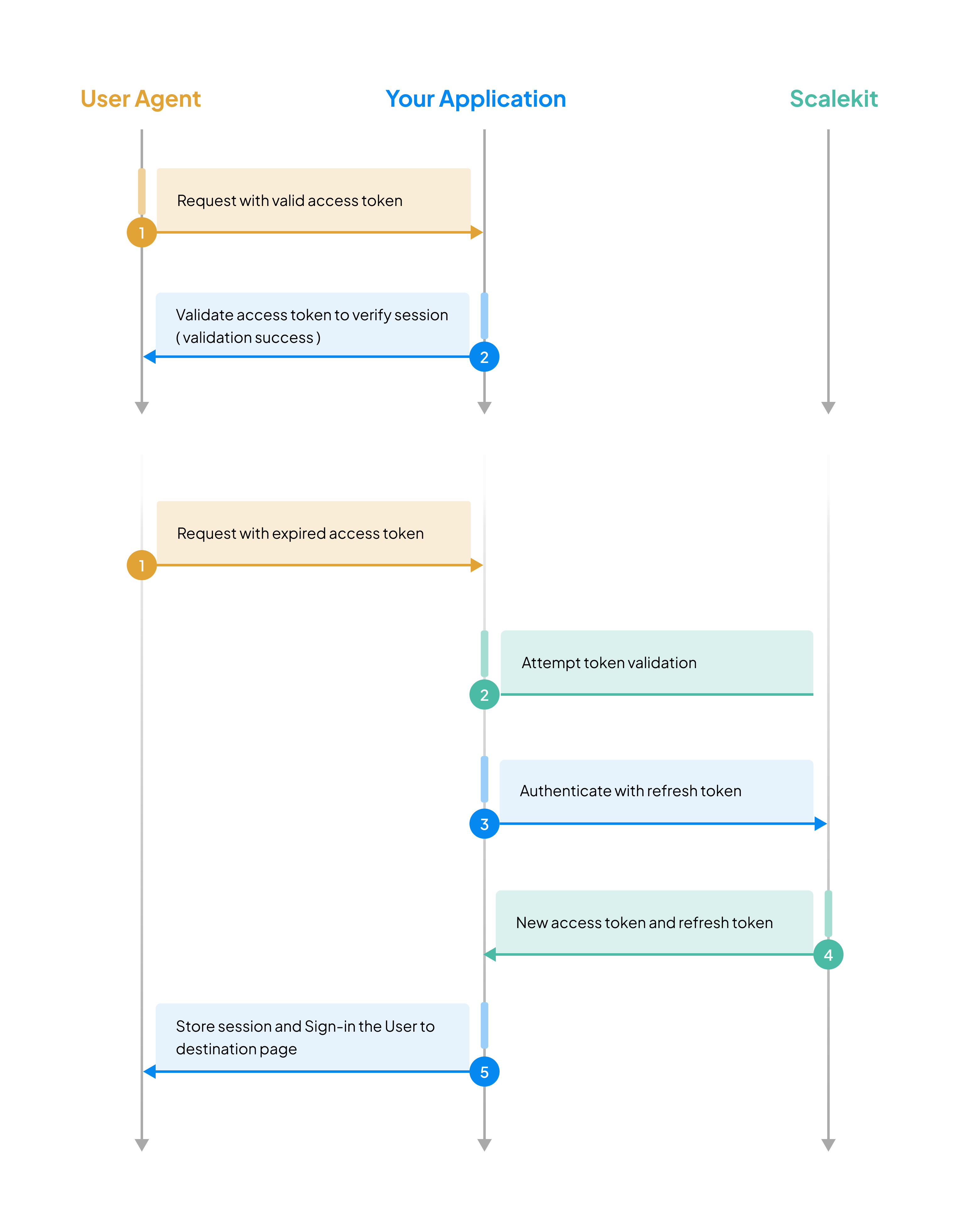
-
Store the session
Section titled “Store the session”After hosted login, session middleware writes one encrypted
sk_sessioncookie. You do not setaccessTokenorrefreshTokencookies.Add
COOKIE_ENCRYPTION_SECRETto.env. Generate it withopenssl rand -base64 32. Use the same value on every server.Install
@scalekit-sdk/node2.12.0 or later. Mountauth.router. It registers/login,/callback, and/logout. The callback writessk_session.server.ts import express from 'express';import { ScalekitAuth } from '@scalekit-sdk/node/express';const auth = new ScalekitAuth({envUrl: process.env.SCALEKIT_ENVIRONMENT_URL,clientId: process.env.SCALEKIT_CLIENT_ID,clientSecret: process.env.SCALEKIT_CLIENT_SECRET,redirectUri: process.env.REDIRECT_URI,cookieEncryptionSecret: process.env.COOKIE_ENCRYPTION_SECRET,});const app = express();app.use(auth.router);Install
@scalekit-sdk/node2.12.0 or later. Create oneauthinstance. Export login, callback, and logout Route Handlers. The callback writessk_session.lib/auth.ts import { ScalekitClient } from '@scalekit-sdk/node';import { ScalekitAuthNext } from '@scalekit-sdk/node/next';const scalekit = new ScalekitClient(process.env.SCALEKIT_ENVIRONMENT_URL!,process.env.SCALEKIT_CLIENT_ID!,process.env.SCALEKIT_CLIENT_SECRET!);export const auth = new ScalekitAuthNext({client: scalekit,redirectUri: process.env.REDIRECT_URI!,cookieEncryptionSecret: process.env.COOKIE_ENCRYPTION_SECRET!,});app/login/route.ts import { auth } from '../../lib/auth';export const GET = auth.createLoginHandler();app/callback/route.ts import { auth } from '../../lib/auth';export const GET = auth.createCallbackHandler();app/logout/route.ts import { auth } from '../../lib/auth';export const GET = auth.createLogoutHandler();Pin
runtime: 'nodejs'inmiddleware.ts, or pass ScalekitEdgeClient for Edge Runtime.Install
scalekit-sdk-python2.17.0 or later with the Flask extra.ScalekitAuthregisters/login,/callback, and/logoutand writessk_session.app.py import osfrom flask import Flaskfrom scalekit.frameworks.flask import ScalekitAuthapp = Flask(__name__)auth = ScalekitAuth(app,env_url=os.environ["SCALEKIT_ENVIRONMENT_URL"],client_id=os.environ["SCALEKIT_CLIENT_ID"],client_secret=os.environ["SCALEKIT_CLIENT_SECRET"],redirect_uri=os.environ["REDIRECT_URI"],cookie_encryption_secret=os.environ["COOKIE_ENCRYPTION_SECRET"],# HTTP localhost drops a Secure cookie, so the session never sticks.# A missing Secure flag on real HTTP lets the browser send sk_session in cleartext.cookie_secure=False,)Install
scalekit-sdk-python2.17.0 or later with the FastAPI extra. Callauth.install(app)to register routes and writesk_session.app.py import osfrom fastapi import FastAPIfrom scalekit.frameworks.fastapi import ScalekitAuthapp = FastAPI()auth = ScalekitAuth(env_url=os.environ["SCALEKIT_ENVIRONMENT_URL"],client_id=os.environ["SCALEKIT_CLIENT_ID"],client_secret=os.environ["SCALEKIT_CLIENT_SECRET"],redirect_uri=os.environ["REDIRECT_URI"],cookie_encryption_secret=os.environ["COOKIE_ENCRYPTION_SECRET"],# HTTP localhost drops a Secure cookie, so the session never sticks.# A missing Secure flag on real HTTP lets the browser send sk_session in cleartext.cookie_secure=False,)auth.install(app)Gin 7 collapsed linesimport ("net/http""os""time""github.com/gin-gonic/gin")// Extract authentication data from the successful authentication responseaccessToken := authResult.AccessTokenexpiresIn := authResult.ExpiresInrefreshToken := authResult.RefreshTokenuser := authResult.User// Encrypt tokens before storing to add an additional security layerencryptedAccessToken := encrypt(accessToken)encryptedRefreshToken := encrypt(refreshToken)// Set SameSite mode for CSRF protectionc.SetSameSite(http.SameSiteStrictMode) // Prevents CSRF attacks// Store encrypted access token in HttpOnly cookiec.SetCookie("accessToken",encryptedAccessToken,expiresIn-60, // Subtract 60s buffer for clock skew (seconds in Gin)"/", // Available on all routes"",os.Getenv("GIN_MODE") == "release", // HTTPS-only in productiontrue, // Prevents JavaScript access to mitigate XSS attacks)// Store encrypted refresh token in separate HttpOnly cookiec.SetCookie("refreshToken",encryptedRefreshToken,0, // No expiry for refresh token cookie (session lifetime controlled server-side)"/", // Available on all routes"",os.Getenv("GIN_MODE") == "release", // HTTPS-only in productiontrue, // Prevents JavaScript access to mitigate XSS attacks)Spring 6 collapsed linesimport javax.servlet.http.Cookie;import javax.servlet.http.HttpServletResponse;import org.springframework.core.env.Environment;@Autowiredprivate Environment env;// Extract authentication data from the successful authentication responseString accessToken = authResult.getAccessToken();int expiresIn = authResult.getExpiresIn();String refreshToken = authResult.getRefreshToken();User user = authResult.getUser();// Encrypt tokens before storing to add an additional security layerString encryptedAccessToken = encrypt(accessToken);String encryptedRefreshToken = encrypt(refreshToken);// Store encrypted access token in HttpOnly cookieCookie accessTokenCookie = new Cookie("accessToken", encryptedAccessToken);accessTokenCookie.setMaxAge(expiresIn - 60); // Subtract 60s buffer for clock skew (seconds in Spring)accessTokenCookie.setHttpOnly(true); // Prevents JavaScript access to mitigate XSS attacksaccessTokenCookie.setSecure("production".equals(env.getActiveProfiles()[0])); // HTTPS-only in productionaccessTokenCookie.setPath("/"); // Available on all routesresponse.addCookie(accessTokenCookie);response.setHeader("Set-Cookie",response.getHeader("Set-Cookie") + "; SameSite=Strict"); // Prevents CSRF attacks// Store encrypted refresh token in separate HttpOnly cookieCookie refreshTokenCookie = new Cookie("refreshToken", encryptedRefreshToken);refreshTokenCookie.setHttpOnly(true); // Prevents JavaScript access to mitigate XSS attacksrefreshTokenCookie.setSecure("production".equals(env.getActiveProfiles()[0])); // HTTPS-only in productionrefreshTokenCookie.setPath("/"); // Available on all routesresponse.addCookie(refreshTokenCookie); -
Check the session before handling requests
Section titled “Check the session before handling requests”Session middleware refreshes
sk_sessionand redirects to/loginwhen the session is missing. A missing session returns 302, not JSON 401.Guard a route with
auth.requiresAuth. On success,req.scalekitUseris access-token claims.subis always present.server.ts app.get('/account', auth.requiresAuth, (req, res) => {res.json({ sub: req.scalekitUser?.sub });});Wrap a Route Handler with
withAuth. UsecreateMiddleware()so every other path fails closed. List public paths inpublicRoutes.app/account/route.ts import { auth } from '../../lib/auth';export const GET = auth.withAuth(async (request, { user }) => {return Response.json({ sub: user?.sub });});middleware.ts import { auth } from './lib/auth';export default auth.createMiddleware({publicRoutes: ['/', '/pricing'],});export const config = {runtime: 'nodejs',matcher: ['/((?!_next/static|_next/image|favicon.ico).*)'],};Guard a view with
@auth.requires_auth.auth.current_useris access-token claims.app.py @app.route("/account")@auth.requires_authdef account():return {"sub": auth.current_user["sub"]}Protect a route with
Depends(auth.requires_auth). The dependency is the user claims.app.py from fastapi import Depends@app.get("/account")async def account(user: dict = Depends(auth.requires_auth)):return {"sub": user["sub"]}middleware/auth.go 5 collapsed linesimport ("net/http""os""github.com/gin-gonic/gin")func VerifyToken() gin.HandlerFunc {return func(c *gin.Context) {// Extract encrypted tokens from request cookiesaccessToken, err := c.Cookie("accessToken")if err != nil || accessToken == "" {c.JSON(http.StatusUnauthorized, gin.H{"error": "Authentication required"})c.Abort()return}// Decrypt the access token before validationdecryptedAccessToken := decrypt(accessToken)// Verify token validity using Scalekit's validation methodisValid, err := scalekitClient.ValidateAccessToken(c.Request.Context(), decryptedAccessToken)if (err != nil || !isValid) {// Token expired - attempt transparent refreshrefreshToken, err := c.Cookie("refreshToken")if err == nil && refreshToken != "" {decryptedRefreshToken := decrypt(refreshToken)authResult, err := scalekitClient.RefreshAccessToken(c.Request.Context(), decryptedRefreshToken)if err == nil {// Encrypt and store new tokensc.SetSameSite(http.SameSiteStrictMode)c.SetCookie("accessToken",encrypt(authResult.AccessToken),authResult.ExpiresIn-60,"/","",os.Getenv("GIN_MODE") == "release",true,)c.SetCookie("refreshToken",encrypt(authResult.RefreshToken),0,"/","",os.Getenv("GIN_MODE") == "release",true,)c.Next()return}}c.JSON(http.StatusUnauthorized, gin.H{"error": "Session expired. Please sign in again."})c.Abort()return}// Token is valid, proceed to the next handler in the chainc.Next()}}middleware/AuthInterceptor.java 5 collapsed linesimport javax.servlet.http.HttpServletRequest;import javax.servlet.http.HttpServletResponse;import javax.servlet.http.Cookie;import org.springframework.web.servlet.HandlerInterceptor;import org.springframework.core.env.Environment;/*** Intercepts HTTP requests to verify authentication tokens.* Transparently refreshes expired tokens to maintain user sessions.*/@Componentpublic class AuthInterceptor implements HandlerInterceptor {@Autowiredprivate Environment env;@Overridepublic boolean preHandle(HttpServletRequest request,HttpServletResponse response,Object handler) throws Exception {7 collapsed lines// Extract encrypted tokens from cookiesString accessToken = getCookieValue(request, "accessToken");String refreshToken = getCookieValue(request, "refreshToken");if (accessToken == null) {response.setStatus(HttpServletResponse.SC_UNAUTHORIZED);response.getWriter().write("{\"error\": \"Authentication required\"}");return false;}try {// Decrypt the access token before validationString decryptedAccessToken = decrypt(accessToken);// Verify token validity using Scalekit's validation methodboolean isValid = scalekitClient.validateAccessToken(decryptedAccessToken);if (!isValid && refreshToken != null) {// Token expired - refresh it transparentlyString decryptedRefreshToken = decrypt(refreshToken);AuthResult authResult = scalekitClient.authentication().refreshToken(decryptedRefreshToken);// Encrypt and store new tokens20 collapsed linesCookie accessTokenCookie = new Cookie("accessToken", encrypt(authResult.getAccessToken()));accessTokenCookie.setMaxAge(authResult.getExpiresIn() - 60);accessTokenCookie.setHttpOnly(true);accessTokenCookie.setSecure("production".equals(env.getActiveProfiles()[0]));accessTokenCookie.setPath("/");response.addCookie(accessTokenCookie);Cookie refreshTokenCookie = new Cookie("refreshToken", encrypt(authResult.getRefreshToken()));refreshTokenCookie.setHttpOnly(true);refreshTokenCookie.setSecure("production".equals(env.getActiveProfiles()[0]));refreshTokenCookie.setPath("/");response.addCookie(refreshTokenCookie);response.setHeader("Set-Cookie", response.getHeader("Set-Cookie") + "; SameSite=Strict");return true;}if (!isValid) {response.setStatus(HttpServletResponse.SC_UNAUTHORIZED);response.getWriter().write("{\"error\": \"Session expired. Please sign in again.\"}");return false;}// Token is valid, allow request to proceedreturn true;} catch (Exception e) {response.setStatus(HttpServletResponse.SC_UNAUTHORIZED);response.getWriter().write("{\"error\": \"Authentication failed\"}");return false;}}private String getCookieValue(HttpServletRequest request, String cookieName) {Cookie[] cookies = request.getCookies();if (cookies != null) {for (Cookie cookie : cookies) {if (cookieName.equals(cookie.getName())) {return cookie.getValue();}}}return null;}}Build it yourself — store cookies and call validateAccessToken
Use this path when you do not use session middleware. Request
offline_accessso you receive a refresh token. Scalekit rotates refresh tokens. Store the new refresh token and discard the old one.Store the access token in an HttpOnly cookie. Store the refresh token in a separate HttpOnly cookie. Encrypt both values.
Express.js — set cookies const { accessToken, expiresIn, refreshToken } = authResult;res.cookie('accessToken', encrypt(accessToken), {maxAge: (expiresIn - 60) * 1000,httpOnly: true,secure: process.env.NODE_ENV === 'production',sameSite: 'lax',});res.cookie('refreshToken', encrypt(refreshToken), {httpOnly: true,secure: process.env.NODE_ENV === 'production',sameSite: 'lax',});Express.js — verify and refresh async function verifyToken(req, res, next) {const { accessToken, refreshToken } = req.cookies;if (!accessToken) {return res.status(401).json({ error: 'Authentication required' });}const decryptedAccessToken = decrypt(accessToken);const isValid = await scalekit.validateAccessToken(decryptedAccessToken);if (!isValid && refreshToken) {const authResult = await scalekit.refreshAccessToken(decrypt(refreshToken));res.cookie('accessToken', encrypt(authResult.accessToken), {maxAge: (authResult.expiresIn - 60) * 1000,httpOnly: true,secure: process.env.NODE_ENV === 'production',sameSite: 'lax',});res.cookie('refreshToken', encrypt(authResult.refreshToken), {httpOnly: true,secure: process.env.NODE_ENV === 'production',sameSite: 'lax',});return next();}if (!isValid) {return res.status(401).json({ error: 'Session expired. Please sign in again.' });}next();}Flask — verify and refresh import osfrom functools import wrapsfrom flask import request, jsonify, make_responsedef verify_token(f):@wraps(f)def decorated_function(*args, **kwargs):access_token = request.cookies.get("accessToken")refresh_token = request.cookies.get("refreshToken")if not access_token:return jsonify({"error": "Authentication required"}), 401is_valid = scalekit_client.validate_access_token(decrypt(access_token))if not is_valid and refresh_token:auth_result = scalekit_client.refresh_access_token(decrypt(refresh_token))response = make_response(f(*args, **kwargs))response.set_cookie("accessToken",encrypt(auth_result.access_token),max_age=auth_result.expires_in - 60,httponly=True,secure=os.environ.get("FLASK_ENV") == "production",samesite="Lax",)response.set_cookie("refreshToken",encrypt(auth_result.refresh_token),httponly=True,secure=os.environ.get("FLASK_ENV") == "production",samesite="Lax",)return responseif not is_valid:return jsonify({"error": "Session expired. Please sign in again."}), 401return f(*args, **kwargs)return decorated_functionTypeScript: get typed claims from validateToken
Use a generic type parameter to get properly typed claims instead of
unknown. PassJWTPayloadfromjosefor access tokens, orIdTokenClaimfrom@scalekit-sdk/nodefor ID tokens:import type { JWTPayload } from 'jose';import type { IdTokenClaim } from '@scalekit-sdk/node';// Access token — typed as JWTPayloadconst claims = await scalekit.validateToken<JWTPayload>(accessToken);console.log(claims.sub); // user ID// ID token — typed with full user profile claimsconst idClaims = await scalekit.validateToken<IdTokenClaim>(idToken);console.log(idClaims.email); -
Configure session security and duration
Section titled “Configure session security and duration”Manage user session behavior directly from your Scalekit dashboard without modifying application code. Configure session durations and authentication frequency to balance security and user experience for your application.
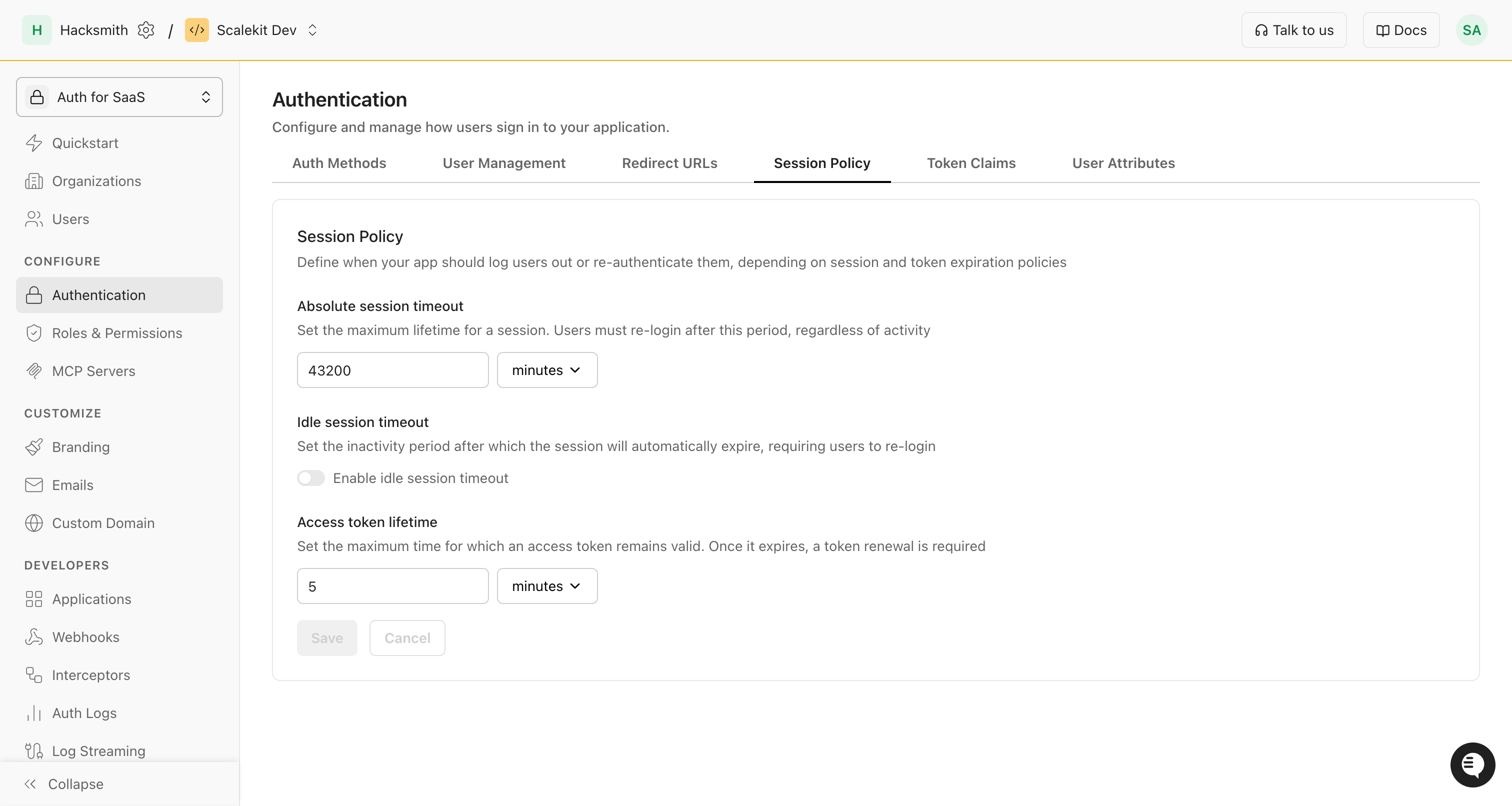
In your Scalekit dashboard, the Session settings page lets you set these options:
-
Absolute session timeout: This is the maximum time a user can stay signed in, no matter what. After this time, they must log in again. For example, if you set it to 30 minutes, users will be logged out after 30 minutes, even if they are still using your app.
-
Idle session timeout: This is the time your app waits before logging out a user who is not active. If you turn this on, the session will end if the user does nothing for the set time. For example, if you set it to 10 minutes, and the user does not click or type for 10 minutes, they will be logged out.
-
Access token lifetime: This is how long an access token is valid. When it expires, your app needs to get a new token (using the refresh token) so the user can keep using the app without logging in again. For example, if you set it to 5 minutes, your app will need to refresh the token every 5 minutes.
Shorter timeouts provide better security, while longer timeouts reduce authentication interruptions.
-
-
Manage sessions remotely API
Section titled “Manage sessions remotely ”Beyond client-side session management, Scalekit provides powerful APIs to manage user sessions remotely from your backend application. This enables you to build features like active session management in user account settings, security incident response, or administrative session control.
These APIs are particularly useful for:
- Displaying all active sessions in user account settings
- Allowing users to revoke specific sessions from unfamiliar devices
- Security incident response and suspicious session termination
Session Management SDK // Get details for a specific sessionconst sessionDetails = await scalekit.session.getSession('ses_1234567890123456');// List all sessions for a user with optional filteringconst userSessions = await scalekit.session.getUserSessions('usr_1234567890123456', {pageSize: 10,filter: {status: ['ACTIVE'], // Filter for active sessions onlystartTime: new Date('2025-01-01T00:00:00Z'),endTime: new Date('2025-12-31T23:59:59Z')}});// Revoke a specific session (useful for "Sign out this device" functionality)const revokedSession = await scalekit.session.revokeSession('ses_1234567890123456');// Revoke all sessions for a user (useful for "Sign out all devices" functionality)const revokedSessions = await scalekit.session.revokeAllUserSessions('usr_1234567890123456');console.log(`Revoked sessions for user`);Session Management SDK # Get details for a specific sessionsession_details = scalekit_client.sessions.get_session(session_id="ses_1234567890123456")# List all sessions for a user with optional filteringfrom google.protobuf.timestamp_pb2 import Timestampfrom datetime import datetimestart_time = Timestamp()start_time.FromDatetime(datetime(2025, 1, 1))end_time = Timestamp()end_time.FromDatetime(datetime(2025, 12, 31))filter_obj = scalekit_client.sessions.create_session_filter(status=["ACTIVE"], start_time=start_time, end_time=end_time)user_sessions = scalekit_client.sessions.get_user_sessions(user_id="usr_1234567890123456", page_size=10, filter=filter_obj)# Revoke a specific session (useful for "Sign out this device" functionality)revoked_session = scalekit_client.sessions.revoke_session(session_id="ses_1234567890123456")# Revoke all sessions for a user (useful for "Sign out all devices" functionality)revoked_sessions = scalekit_client.sessions.revoke_all_user_sessions(user_id="usr_1234567890123456")print(f"Revoked sessions for user")Session Management SDK // Get details for a specific sessionsessionDetails, err := scalekitClient.Session().GetSession(ctx, "ses_1234567890123456")if err != nil {log.Fatal(err)}// List all sessions for a user with optional filtering// import "time", sessionsv1 "...", "google.golang.org/protobuf/types/known/timestamppb"startTime, _ := time.Parse(time.RFC3339, "2025-01-01T00:00:00Z")endTime, _ := time.Parse(time.RFC3339, "2025-12-31T23:59:59Z")filter := &sessionsv1.UserSessionFilter{Status: []string{"ACTIVE"}, // Filter for active sessions onlyStartTime: timestamppb.New(startTime),EndTime: timestamppb.New(endTime),}userSessions, err := scalekitClient.Session().GetUserSessions(ctx, "usr_1234567890123456", 10, "", filter)if err != nil {log.Fatal(err)}// Revoke a specific session (useful for "Sign out this device" functionality)revokedSession, err := scalekitClient.Session().RevokeSession(ctx, "ses_1234567890123456")if err != nil {log.Fatal(err)}// Revoke all sessions for a user (useful for "Sign out all devices" functionality)revokedSessions, err := scalekitClient.Session().RevokeAllUserSessions(ctx, "usr_1234567890123456")if err != nil {log.Fatal(err)}fmt.Printf("Revoked sessions for user")Session Management SDK // Get details for a specific sessionSessionDetails sessionDetails = scalekitClient.sessions().getSession("ses_1234567890123456");// List all sessions for a user with optional filtering// import UserSessionFilter, Timestamp, InstantUserSessionFilter filter = UserSessionFilter.newBuilder().addStatus("ACTIVE").setStartTime(Timestamp.newBuilder().setSeconds(Instant.parse("2025-01-01T00:00:00Z").getEpochSecond()).build()).setEndTime(Timestamp.newBuilder().setSeconds(Instant.parse("2025-12-31T23:59:59Z").getEpochSecond()).build()).build();UserSessionDetails userSessions = scalekitClient.sessions().getUserSessions("usr_1234567890123456", 10, "", filter);// Revoke a specific session (useful for "Sign out this device" functionality)RevokeSessionResponse revokedSession = scalekitClient.sessions().revokeSession("ses_1234567890123456");// Revoke all sessions for a user (useful for "Sign out all devices" functionality)RevokeAllUserSessionsResponse revokedSessions = scalekitClient.sessions().revokeAllUserSessions("usr_1234567890123456");System.out.println("Revoked sessions for user");
After you add the helper, open /account in the browser. A missing session goes to /login. After login, the browser returns to /account.
Session middleware validates sk_session on each request and refreshes it before expiry. If the refresh token is invalid, the helper sends the browser to /login.